
iPhone Hidden Feature: Dancing Dots Feature Could Be the Solution to Motion Sickness

Frank Ocansey
Editor, PulseView

iPhone Hidden Feature:For millions of people, reading a text message, scrolling through social media or replying to emails while travelling can quickly end in dizziness, nausea and discomfort.
Now, a little-known feature hidden deep within Apple’s iPhone settings is attracting attention for helping reduce motion sickness using nothing more than a series of animated dots that move across the screen.
Known as Vehicle Motion Cues, the accessibility feature is winning praise from users who say it has transformed their daily commutes. While scientists say more research is needed to fully understand its effectiveness, many believe it represents an innovative use of technology to solve a common health problem.
What Are Vehicle Motion Cues?
Vehicle Motion Cues is an accessibility feature introduced by Apple that displays small animated dots along the edges of an iPhone’s screen.
As the vehicle accelerates, brakes or turns, the dots move in the same direction using information from the phone’s built-in motion sensors.
Rather than being decorative, the moving dots are designed to give the brain visual clues about the vehicle’s movement, helping reduce the sensory confusion believed to trigger motion sickness.
Many iPhone users have only recently discovered the feature after noticing the unusual moving dots on other people’s screens during bus, train and car journeys.
Why Do People Get Motion Sickness?
Motion sickness affects people differently, but experts believe it occurs when the brain receives conflicting information from different parts of the body.
For example, while sitting inside a moving car:
- Your inner ear detects movement.
- Your eyes may focus on a stationary phone or book.
- Your brain struggles to reconcile these conflicting signals.
This mismatch can trigger symptoms such as:
- Nausea
- Dizziness
- Cold sweats
- Headaches
- Vomiting
- Fatigue
Children, pregnant women and people who experience migraines are often more susceptible to motion sickness.
How the iPhone Feature Works
Vehicle Motion Cues attempts to solve this problem by making the screen itself acknowledge the vehicle’s movement.
When the car turns left, the dots drift accordingly.
When it accelerates or slows down, the dots shift in response.
These subtle movements provide additional visual information that may help the brain better understand what the body is experiencing.
Researchers say the principle is similar to looking out of a vehicle’s window, where seeing the landscape move naturally helps many people avoid nausea.
What Experts Say
Specialists studying balance disorders believe the technology has scientific merit.
Dr Kristen Steenerson, a clinical associate professor at Stanford University who researches the body’s balance system, says visual feedback can help reduce motion sickness by giving the brain better information about movement.
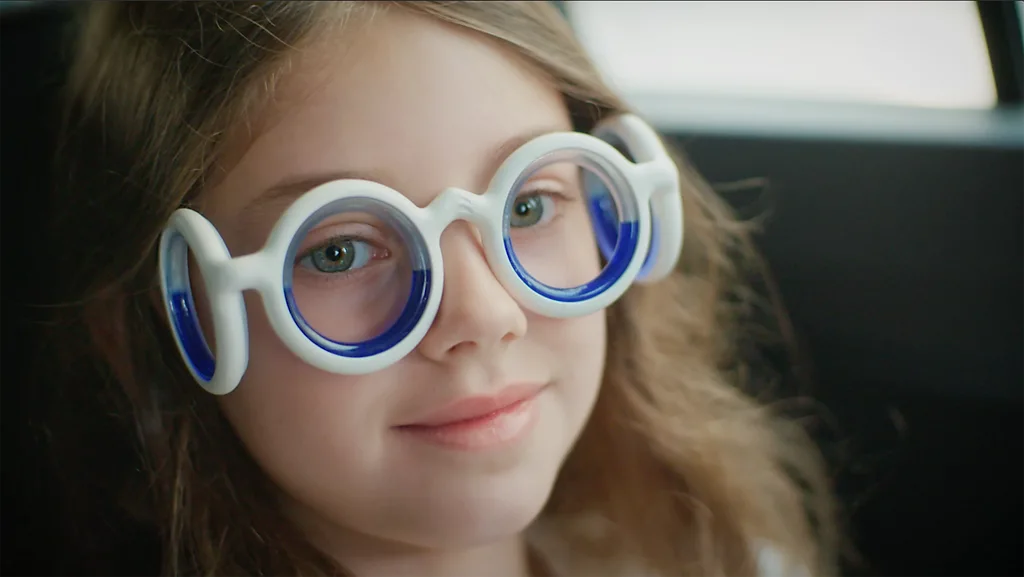
She notes that similar concepts have already been used in specialised anti-motion sickness glasses filled with coloured liquid that shifts as the wearer moves.
These glasses have shown promising results in scientific studies, suggesting Apple’s digital approach follows the same underlying principle.
Not Everyone Agrees on the Cause
Scientists continue to debate exactly why motion sickness occurs.
The traditional explanation is known as the sensory conflict theory, which argues that nausea develops because the eyes and inner ear send contradictory information to the brain.
However, Professor Tom Stoffregen from the University of Minnesota believes the issue may instead involve the body’s posture-control system.
According to his research, the body constantly predicts how it will move. When those predictions repeatedly fail—such as when riding as a passenger the resulting confusion may lead to motion sickness.
Although the theories differ, both acknowledge that improving the brain’s understanding of movement can help reduce symptoms.
Users Report Dramatic Improvements
While scientific studies are still emerging, many users say the feature has made a noticeable difference.
Some report being able to read, browse the internet or work on their phones during journeys without experiencing nausea for the first time.
One New York commuter even told journalists he enjoys the moving dots so much that he leaves them activated all day—even when he is not travelling.
Others describe the feature as life-changing after decades of struggling with car sickness.
Not everyone experiences the same benefit, however.
Some users report only slight improvement, while others notice little difference at all.
How to Turn It On
For iPhone users running recent versions of iOS, enabling Vehicle Motion Cues is straightforward.
Simply follow these steps:
- Open Settings.
- Tap Accessibility.
- Select Motion.
- Tap Vehicle Motion Cues.
- Choose one of the available options:
- Automatic – activates when the phone detects vehicle movement.
- On – remains active at all times.
- Off – disables the feature.
Users can also customise the appearance of the dots by adjusting their size and colour.
A Helpful Innovation or More Screen Time?
While many people welcome the feature, some experts point out an interesting contradiction.
The dots only help if someone is already looking at their phone.
In other words, the technology makes it easier to continue using a screen during journeys rather than encouraging people to simply look out of the window a long-established way of reducing motion sickness naturally.
With concerns growing about excessive screen time, some wonder whether solving motion sickness could inadvertently encourage even greater smartphone use.
Other Ways to Reduce Motion Sickness
Health professionals recommend several strategies alongside digital tools:
- Sit in the front seat of a car whenever possible.
- Look toward the horizon instead of reading.
- Keep fresh air circulating inside the vehicle.
- Stay hydrated.
- Avoid heavy meals before travelling.
- Take regular breaks during long journeys.
- Consider clinically approved anti-motion sickness medication if symptoms are severe.
Looking Ahead
Vehicle Motion Cues demonstrates how smartphone technology is evolving beyond communication and entertainment to address everyday health challenges.
Although it is not a cure for motion sickness, many users say the feature has made travelling far more comfortable.
As technology companies continue developing health-focused accessibility tools, innovations like Apple’s animated dots may represent the beginning of a new generation of digital features designed to improve both comfort and wellbeing.
For anyone who regularly feels nauseous while using their phone in a moving vehicle, this hidden iPhone setting may be worth trying on the next journey.
Source: BBC
Also read: Artificial Intelligence Designs Brand-New Viruses in Scientific Breakthrough
Continue Reading

How to Exercise Safely in Air Pollution: 7 Ways to Reduce Exposure
Exercise Safely: Exercising regularly is one of the most effective ways to protect your health, but what happens when the air you breathe during a workout is polluted? For runners, cyclists and people who walk to work, traffic fumes and airborne particles can turn an otherwise healthy activity into a source of concern. During vigorous […]
Frank Ocansey

Data Centre Backlash: Why AI’s Rapid Expansion Is Facing Local Opposition
Artificial intelligence is developing at extraordinary speed, but the infrastructure powering that revolution is creating a problem that is much more local and increasingly political. Behind every artificial intelligence-generated image, video or answer are enormous data centres filled with powerful computer chips. These facilities require vast amounts of electricity, generate substantial heat and, depending on […]
Frank Ocansey
Can We Change How Our Brains Age? What Scientists Are Discovering
Brains Age: For decades, scientists have known that the way we live can influence how well our bodies age. But a more intriguing question is now gaining attention: could technology help us understand and potentially slow the ageing of the human brain? Researchers are increasingly combining artificial intelligence, brain imaging, sleep tracking, genetics and large […]
Frank Ocansey